Resource Lists
Resource Lists are lists that will help the pre-production of a project. They list what is going to be needed for a project to be created. Resource lists are a really good way of planning everything, is not just showing what is needed to be bought. If what we want is shown this will make the buying or creation easier as some resources can be for free.
Examples of what contains could be:
Materials/Equipment
Location/Facility
Personnel (If group project and roles have to be decided)
Every production needs a different resource list as every production differs form each others.
For my production and my project I will need:
Computer: It needs to meet minimum requirements so the software can be executed properly and it works perfectly. If there is no computer there is no way of Modelling properly, prop creation could take place but when we talk about video games it would be impossible without a PC.
Software to complete Modelling: To complete the Modelling the software needed will have to be suitable for you. It all depends on the opinions of the creator, sometimes it could happen that you will have to use a low-requirement software due to the computer or a free software due to no money or the software being too expensive.
The software will be the structure of the project, as mentioned there are different examples of a Modelling Software, my choice will be Blender.
Work Place-Facility: The workplace is important, we could list different places or facilities but the one I listed is a simple workplace.
A Desktop is what I have to list, it can be at home or college. But any type of desktop or table in general where I can have a PC or Laptop is going to be needed.
Budget Analysis
A budget analysis is similar to a Resource List and it is also linked to it. A Budget Analysis measures the price that the overall project is going to cost. This is because there has to be a price to not surpass, this means that there is a limit. Budget Analysis help to ensure the prices of a Resource List are considerable and can be achieved without going over the limit.
If we use the Resource List as a reference for our Budget List we will come across (As if everything was done from 0):
Price for PC/PC's: Most of the Modelling types of software will not require a High-End PC, it also depends on how much one is willing to spend.
A PC that is around Mid-End and it is okay for modelling and Design will Cost around £700-800. Other Devices that can help designs and modelling could be an add-on and are optional. Prices could be around £100-200
Overall price would be £800-1000.
My case does not apply due to college resources.
Software of Choice: Software of choice does depend, a software such as Blender is free so it won't be a cost but a software like Maya or 3DS Max will have to be purchased. Licenses cost money and depending the size of team, in this case one the price wont be too high. But instead I choose to use Blender which is free and will not cost me anything.
Workplace/Facility: When it comes to modelling a place to put your PC is the place to go, you do not have to spend a lot of money when it comes to it as you can use anywhere in a house or any place in the college. If we had to mention Desktop prices could be around £100-200 but in my case it will cost nothing as I will be using college resources.
Budget can change depending the size of the crew, good computers for 3D could cost around £600-700 (This is an average-cheap price) and then every software that has to be bought.
Depending the number of copies needed prices could go up to £1000 per PC.
Risk Assessment
The actual description of a Risk Assessment is:
A systematic process of evaluating the potential risks that may be involved in a projected activity or undertaking.
In simple words, it is a way to measure potential risks or accidents in a workplace and also a way to undertake or prevent those risks.
If we are doing 3D Modelling there are some risks we will need to measure and prevent. First, we need to identify what is the worst thing that can happen when we work with computers and then a way to prevent them. Some examples of risks in the workplace when it comes 3D Modelling are:
Files getting Corrupted or Lost & Unsaved Work: This is a really big risk when it comes to topics like Modelling or anything that has to do with games.
Losing files and having files corrupted is the worst thin that can happen because in the most cases the files are irreplaceable, this is the same for losing work. Unsaved is kind of different as some work still saved.
Ways to prevent the risks:
Corrupted: A way of preventing corrupted files is to extract any time of storage (USB, Hard Drive) in a safely way. Another way is to not share that storage, I mean that other files that are downloaded from anywhere are downloaded or installed on that storage.
Lost: A simple way to prevent losing work is to always have a backup, this can be done by saving work twice with different names or having Email/External Storage backups.
Unsaved: Unsaved work is similar to lost, the difference is that some work may be able to be restored. Making back ups and saving from time to time will help to prevent unsaved work.
Fire: It does sound rare but a fire could start due to short-circuits,it is something simple that could cause a major problem.
Easy ways to prevent fires are:
Wires and Cables have to be ordered properly, not connecting a lot of devices in the same extension.
Trying to not have any liquids around.
These are methods that will help to prevent fire.
To overtake the risks methods used are fire exits or fire extinguishers.
Trips and Falls: Trips and Falls may be minor but it can damage the devices and injury the people around pretty badly.
Trips and falls may happen due to can cable management, really bad and unsafe workplace where everything is lying around.
Methods to prevent Trips and Falls are:
Tiding up the workplace.
Manage cables.
SWOT Analysis
Process that identifies an organisation's strengths, weaknesses, opportunities and threats. Specifically, SWOT id s basic analytical framework.
My SWOT analysis
SWOT analysis will identify Strengths, Weaknesses, Opportunities, Threats. This is a pretty good planning system to make sure what you need to get better at and what you need to have in mind to complete a task.
Strengths: Quick learner, Good Adaptation.
Weaknesses: Bad time-management.
Opportunities: A new software that I can learn
Threats: Time (Deadline), Computers crashing and problems that I cannot control (Data Loss).
By identifying each one I can manage my project in a better way.
Recce Report
It is used for safety purposes and to scout and area and make it suitable.
Also consists in procedure checks to make sure everything is running smooth were no faults can be seen.
A recce report for my project will scout an are such as a Classroom or a Bedroom. This will look and sound similar to a Risk assessment but a Risk Assessment will cover how to undertake risks (It is in the name). Recce report scouts and area and does not focus on a section, it is more general.
Overall, as mentioned, a Recce Report does make a place suitable for work then after having that done a Risk Assessment will take place.
This is an example to show how a Recce Report would look like.
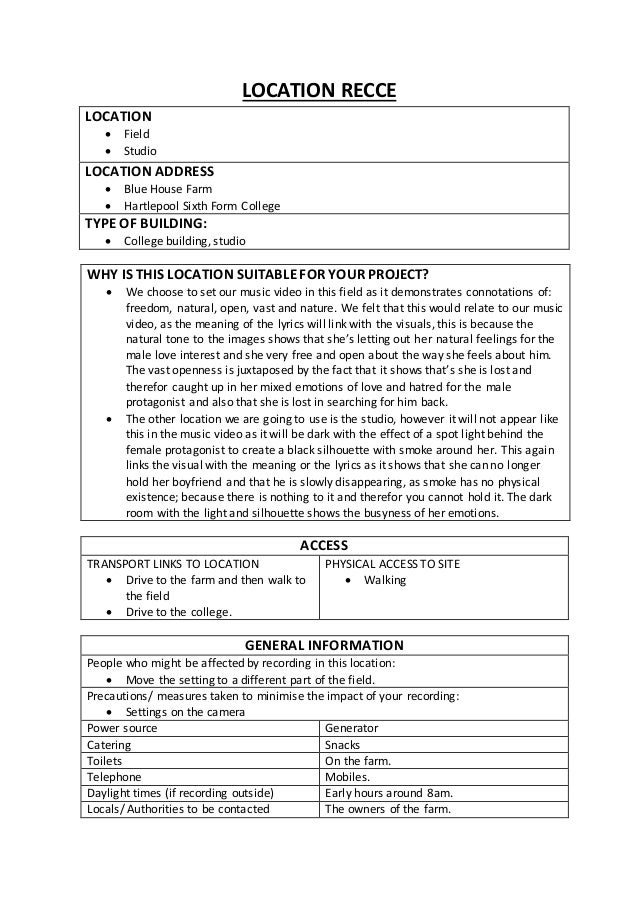
This is my Recce Report:
Location:
Classroom
Home
Location Address:
Future Skills College
Why is the Location suitable:
Both rooms (Classroom and personal Bedroom) are suitable, this happens due to various reasons.
In a classroom I will have help of teachers but at home I will be able to have tranquillity.
Both rooms could have some negative points but they are suitable because the positives are higher in number.
Access:
Classroom (College)
By Tram or Bus.
General Information:
People that may be affected in one of the locations:
If something happens in any of both rooms it would affect me or any surrounding people such as Classmates or Family.
Precautions/Measures taken to minimise the risks when modelling or the quality of the modelling:
Settings on the software
Using a software that you are confident with
Keep any type of distraction out of the way
Saving each "X" minutes
Tide everything up and make sure any physical risk is out of the way

No comments:
Post a Comment